

Profile
Profile is the first section in the Account group of the left-hand menu on the Account settings page (Avatar → Account settings). This is where you manage your identity details, security, and account operations.
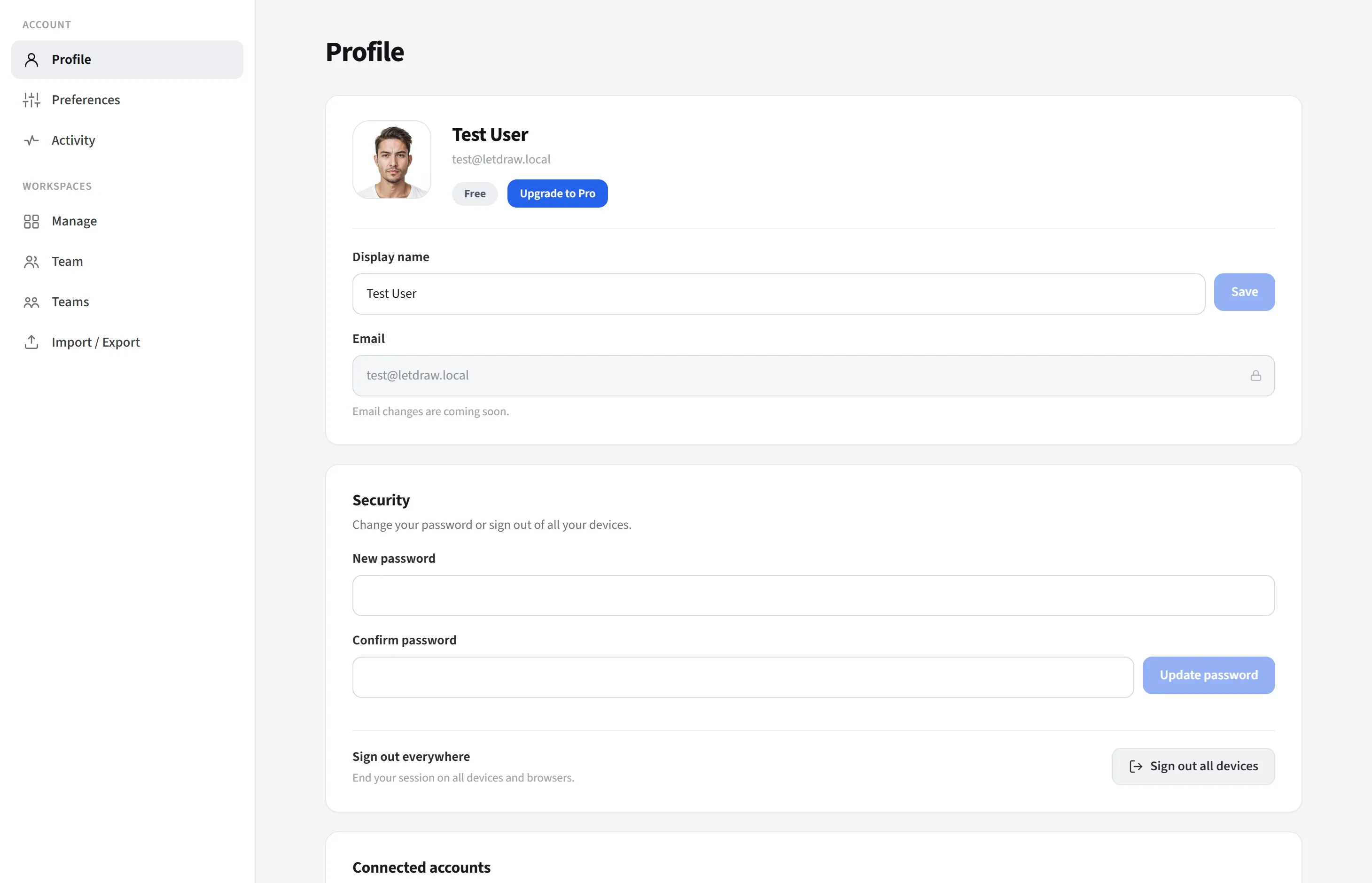
Identity
Section titled “Identity”- Avatar: change or remove your photo.
- Display name: edit it and press Save.
- Email: read-only (cannot be changed).
- Plan badge: Free/Pro/Enterprise; on Free an Upgrade to Pro button appears. (On self-hosted, a license status is shown instead of a plan.)
Security
Section titled “Security”- Change password: enter and confirm a new password.
- Sign out everywhere: ends your sessions on all devices.
Connected accounts
Section titled “Connected accounts”Connected accounts lists the sign-in methods linked to your account; that is, it shows the ways you can sign in to LetDraw. The possible methods are:
- GitHub
- Email & password
Each row shows the provider’s icon, its name, the email linked to that method, and a Connected badge. If no method is linked, it reads “No connected account”.
This section is informational (view only): for example, if you created your account with Google, Google appears here and you can sign in with that method. There is no button here to add or remove a method; its purpose is to let you clearly see which sign-in paths are active on your account (security awareness).
Export my data
Section titled “Export my data”Export my data downloads all of the data linked to your account as a single
JSON file (letdraw-export-<user-id>.json). It is a self-service “get my data”
tool for data portability and regulations such as GDPR.
When you press the Download my data button, the file is prepared and downloaded to your browser (a “check your downloads” notice appears). The file contains:
- Your profile information (excluding billing/internal payment details).
- The workspaces you own.
- Your memberships in other people’s workspaces (which workspace you belong to and with which role).
- The invitations you have sent.
- All folders and documents in the workspaces you own; documents include their full scene content (that is, the actual drawings on the canvas).
- The comments you have written.
- Plus the export time, your user ID, and your email.
Scope (important): This file contains your data only. Other people’s content in a workspace you are only a member of (but do not own) is not included in this file; everyone gets their own export.
If you want to take a single workspace as a portable/re-importable file, use the Import/Export section instead of this one.
Danger zone
Section titled “Danger zone”Delete my account: with a two-step confirmation (open the danger zone, then confirm by typing “DELETE”) this permanently deletes your account.